Web UI
The server embeds a React single-page app at / — browse facts, search, inspect
provenance, time-travel through history, and monitor tasks in real time over SSE.
It browses either a single repo or a lens: one write repo plus
any number of read mounts, federated into one virtual knowledge base.
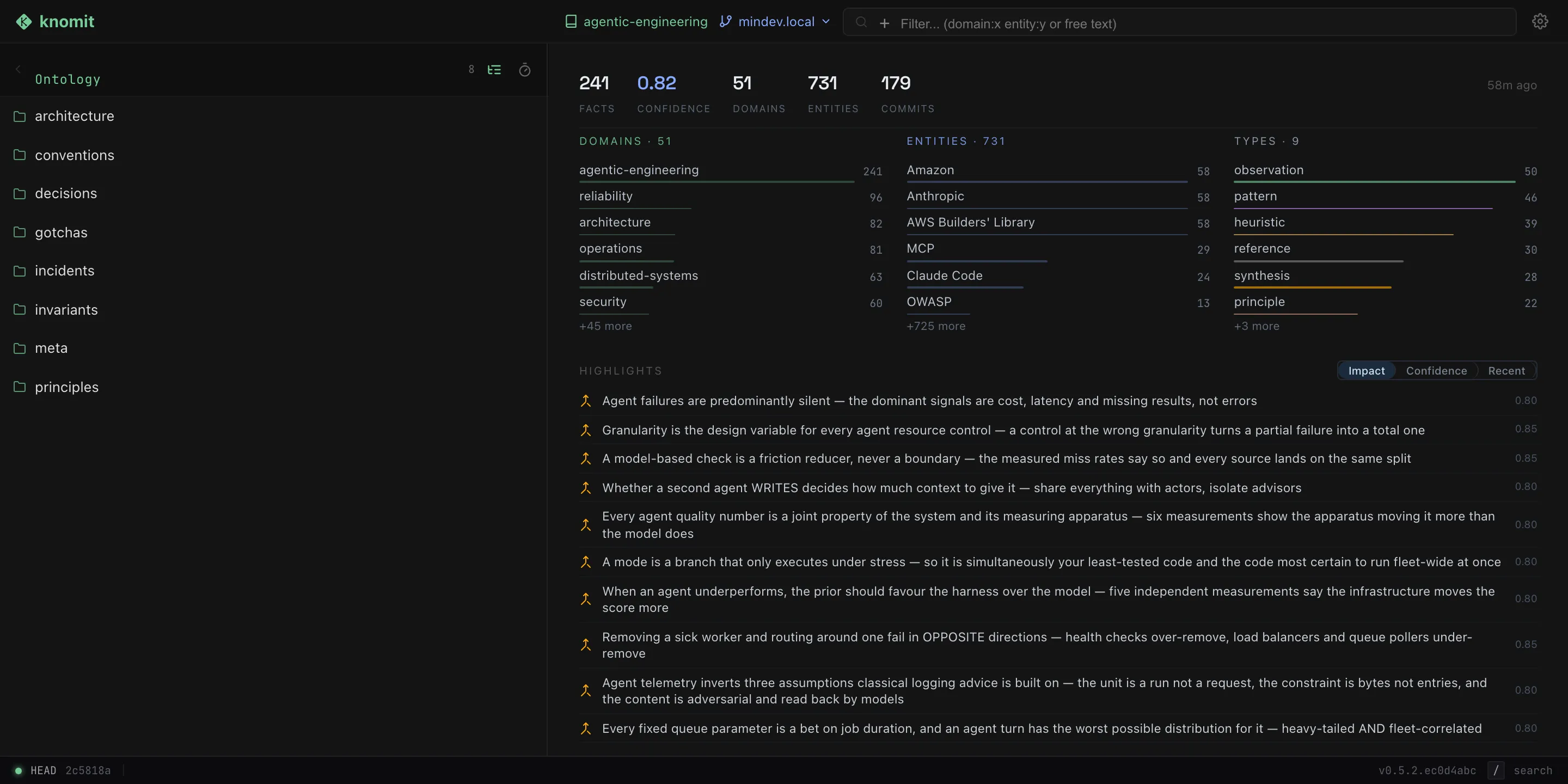
Arriving at the ontology root: the tree on the left, and the folder overview on the right. Captured against the same public knowledge base /explore browses.
The top bar
Section titled “The top bar”- A context switcher lists two groups, Repos and Lenses. It appears when more than one repo exists, when any lens exists, or when you are already browsing a lens.
- In a lens context the right zone adds a lens chip, an
N mountspill, and awrites → <write repo>pill naming the write mount. - A gear icon enters and leaves Manage. One control at one anchor: from browse it opens Manage, and from inside Manage it returns you to browsing.
Manage
Section titled “Manage”Manage is a mode, not a dialog — it replaces the browse surface rather than floating above it. It creates, archives, restores and purges repos at runtime, and creates, edits and deletes lenses, all with no CLI and no restart. Remotes are repaired, replaced or disconnected here too (see Remote sync).
It is also the ordinary destination on a fresh install: with no repositories yet, browse has nothing to show, and Manage is where the first repo is made.
Creating a repository
Section titled “Creating a repository”Creating a repo is a guided wizard, not a form with mode tabs. You are never asked to classify your remote before you have the information to do it — the wizard probes, and derives the rest from the answer.
| Step | What it asks | When it appears |
|---|---|---|
| Source | Local-only (with the repo name) or a remote URL | always |
| Access | Credentials, plus the repo name — prefilled from the URL, since git@host:org/arxiv-kb.git is going to be called arxiv-kb | remote |
| Branch | Which branch to build the knowledge base on | remote with branches |
| Ontology | Preset or custom YAML | only when that branch is not already a KB |
| Review | Confirm, then watch progress stream | when the shape is established |
The step list is derived, not stored, so a step is never “skipped” — it is simply not part of your case. Joining a branch that already has an ontology never asks you to pick one, because that ontology governs.
The Branch step is separate from the initial probe because the answer is
per-branch — a repository can carry the ontology on main and not on
develop — and the branch is not known when the origin probe runs. A remote
with no branches at all is a dead end rather than a mode, and the Access step
says so: create a main first, one commit is enough.
The Ontology step offers the built-in presets or a YAML editor with live validation, syntax highlighting and completion. Every diagnostic is reported with its line position, and all of them at once rather than only the first. An uploaded file is validated the same way before it is accepted.
Renaming and licensing
Section titled “Renaming and licensing”- Rename a repository. In the danger zone, gated on typing the current name. The rename re-keys the registry in place rather than closing the store, so SSE subscribers and the search index survive it. Repos and lenses share one namespace, so a name held by either is refused.
- Rename a lens. A lens is keyed by an internal
uid, so its name is display-only and free to change. In-flight MCP cursors are pinned to that uid rather than the name, so a rename cannot orphan a paging session. - Create or edit the repository
LICENSE. A missing one can be created and an existing one edited. The read view stays preformatted rather than rendered as markdown, which would reflow away the line breaks a licence depends on. ALICENSEover 64 KiB is refused rather than replaced — the server cannot read it back to diff it safely, so it leaves the existing file untouched.
Browsing a lens
Section titled “Browsing a lens”The browse context — a repo or a lens — is the single source of truth for what you are looking at. In a lens context the active repo and branch stay pointed at the lens’s write mount, so write routing never breaks. The context is persisted and restored across reloads; a lens deleted since the last visit falls back to a repo context rather than erroring.
| Surface | In a lens context |
|---|---|
| Library | one ontology tree, merged across every mount |
| Sources dropdown | narrows the union to a subset of read mounts; selecting every mount collapses back to “all mounts” |
repo: filter | recognised as a chip category (a repo context leaves repo:foo as free text) |
| Fact view | shows a source-mount badge; editing is permitted only for write-repo facts |
| Colours | each repo gets a deterministic colour, the same wherever it appears |
The Sources dropdown renders only in a lens context.
Creating a lens takes a name, an optional description, one write repo — pinned as an always-on first row, since the server also mounts it for reading — and any number of checkbox read rows, each with a branch picker offering only branches that exist. Lens management also has a detail view per lens.
What you can do
Section titled “What you can do”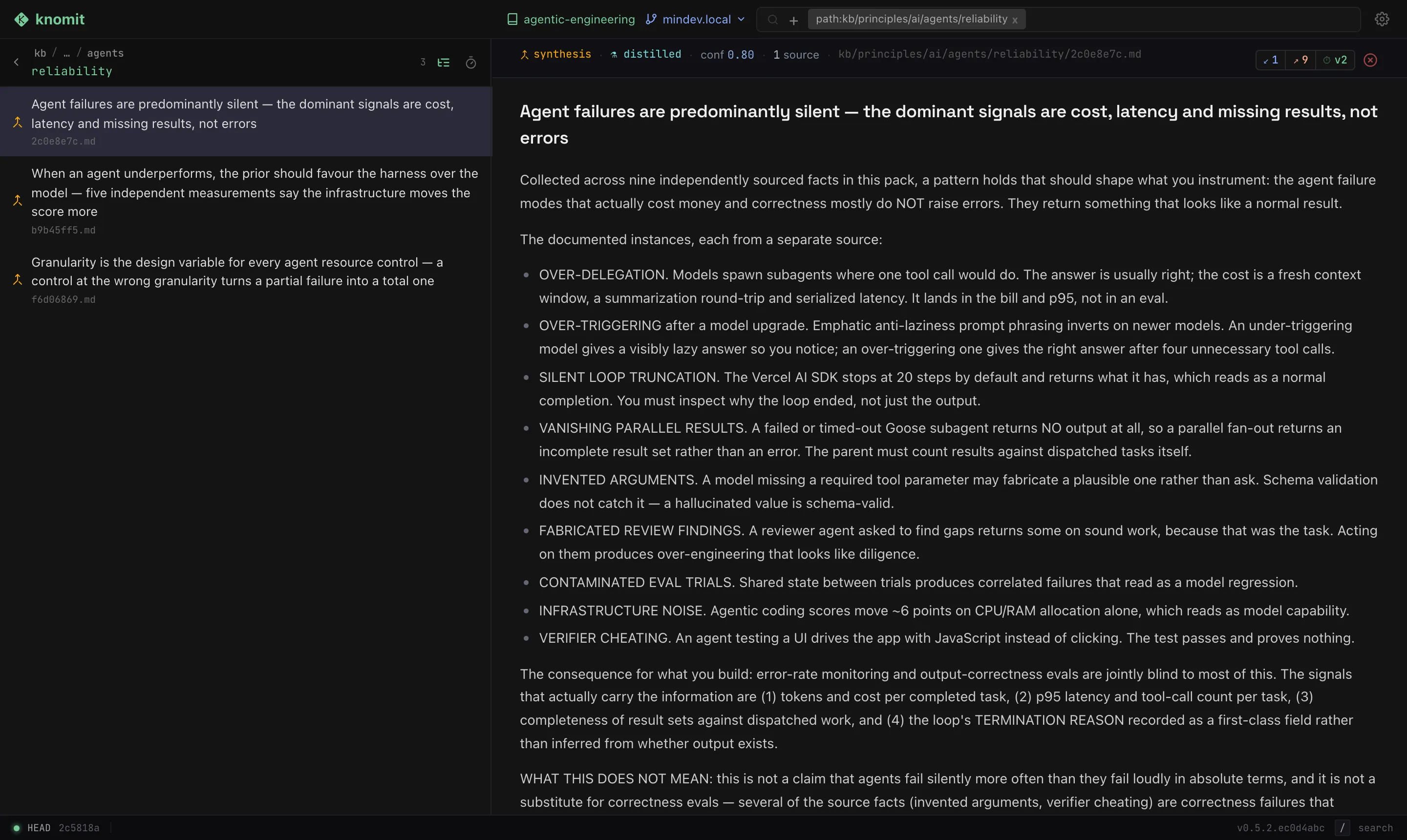
One fact open. The header reads left to right: type and origin, confidence, how many independent sources back it, its path — then the connection counts, the version, and the retract control.
- Library & search — browse the ontology tree and run full-text + vector search across facts.
- Inspect a fact — read its frontmatter, body, and provenance: the signed
commit, the refs it anchors to, and how its confidence evolved. The header
carries connection counts in both directions (
↙incoming,↗outgoing); each opens a panel listing those refs. A count of zero renders as plain text rather than a button, so the header doesn’t reflow between a connected fact and an isolated one. - Read its references honestly — the server classifies every ref, and the UI renders each class differently: a resolvable fact is a clickable hop, a broken one is flagged rather than linked, and refs into another repo, into source code, or out to a URL are labelled as such. Whether a ref resolves is judged at the commit you are viewing, so a hop is never offered into a version where the target did not yet exist.
- See when this version was written — beside the version chip, every fact carries the commit date of the version you are looking at, not of the fact as a whole. It reads as a relative time when you are live, and as an absolute date, in amber, when you are in history — so a version from two years ago cannot be mistaken for the current one. It works the same for repo and lens facts.
- Time-travel — view the knowledge graph as-of any past commit; refs resolve to the versions that existed at that point in time.
- Ontology browser — navigate topics and categories and see inheritance.
- Synthesis & tasks — watch task progress stream live over server-sent events.
- Folder overview — every folder, including the root, opens on a dashboard: headline counts, facets for the domains, entities and types in scope, and highlights, a top-ten of the facts the rest were built on.
- Status footer — the live/history indicator, the anchored commit, and the running build version.
A panel that crashes renders a contained inline fallback; the rest of the app stays usable.
How highlights are ranked
Section titled “How highlights are ranked”Highlights answer “what is load-bearing here”, so they rank by impact: the number of distinct facts a fact was derived from. Observations and references are excluded — they are the substrate the distilled layer is built from, and including them would bury it — unless a folder holds nothing else, in which case it gets its own top-ten rather than an empty panel.
Impact is deliberately global: a fact reports the same number from the repo root as from its own folder, which is what lets you verify it by opening that fact’s connections. You can switch the ranking to confidence or recency; the server picks the default per repo, falling back to confidence where the corpus has no distilled layer for impact to separate.
Keyboard
Section titled “Keyboard”Four global keys, ignored while a text field has focus:
| Key | Effect |
|---|---|
/ | Focus the search/filter input |
Escape | While time-travelling, return to now; otherwise clear the active filters |
Backspace / Delete | Navigate back |
h | Return to HEAD, leaving time-travel |